

Match the cleaner to the work your pool needs
A pool robot can reduce routine vacuuming, but the wrong model can still leave you brushing walls, clearing a full basket, or struggling to store a long cable. If you’re deciding which dolphin pool cleaner to buy, start with the surfaces and areas you need cleaned, then compare the pool-size guidance and features listed for each product. The choices here range from robotic cleaners to accessories, so not every listing is a complete cleaner.
Pool shape and obstructions matter, too. Steps, ladders, raised drains, and shallow ledges can affect how a robot moves, and none of the supplied descriptions guarantees that every feature will be reached. For a compact pool, a simpler plug-and-play model may be enough; a larger in-ground pool may benefit from broader stated coverage or scheduling features. Consider seasonal equipment storage as part of the decision, and see this guide to preparing outdoor water equipment for winter for related off-season planning.
Compare the filter access and the work involved after each cycle, not just the advertised cleaning path. Top-load baskets are described on several models and can be removed for rinsing, while wall and waterline claims vary by model. Check the exact model name and pool-length guidance before ordering. A power supply or caddy may help with ownership, but neither replaces a cleaner.
Product options


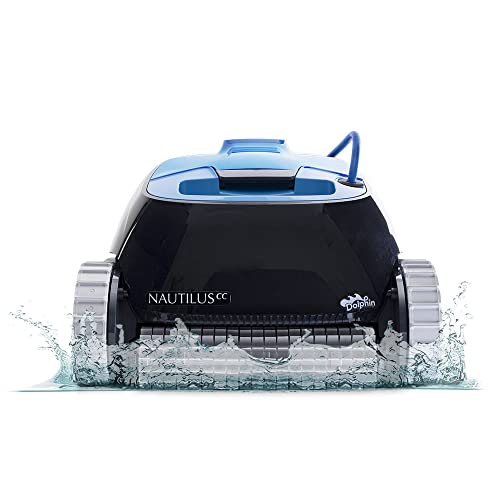


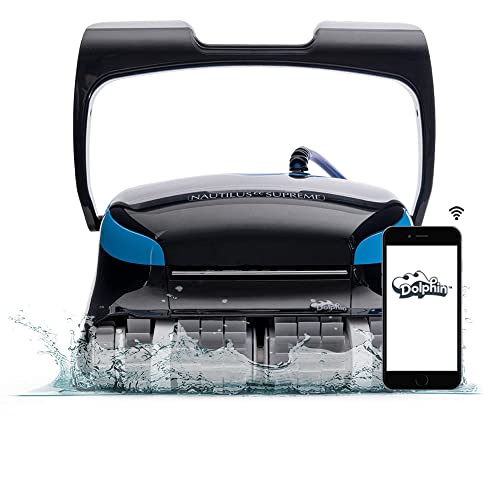
Which Dolphin cleaner fits your pool and routine?
The practical answer depends on what you need the unit to clean and what you’re actually buying. The product information includes several complete robotic cleaners, a caddy, and a replacement power supply. Those accessory listings can support an existing setup, but they aren’t substitutes for a new robot. Check each product’s full listing for current compatibility and included components before making a purchase.
Start with pool length and cleaning coverage
The listed pool-size guidance gives a useful first filter. The Nautilus Pool-Up is described for pools up to 26 feet, the Nautilus CC and Proteus DX4 Plus for pools up to 33 feet, the Nautilus CC Plus for up to 40 feet, and the Nautilus CC Supreme Wi-Fi for up to 50 feet. These are model-specific limits, not a promise that every pool shape will receive the same coverage. Measure the pool and consider whether the cleaner can travel through its full layout without being obstructed.
Coverage descriptions also differ. The Nautilus Pool-Up is presented as an option for small pools that cleans floors and walls, while the Proteus DX4 Plus is described as cleaning floors, walls, the waterline, steps, and sun ledges. The Supreme Wi-Fi listing calls out waterline scrubbing, and the other Nautilus models emphasize wall climbing and active brushing. Those claims come from product descriptions, so they shouldn’t be read as guarantees for narrow steps, sharply curved transitions, or every ledge.
Think about the tasks you still want to do manually. A robot described for wall climbing may reduce routine wall brushing, but the supplied details don’t establish that it will reach every stair tread or remove stubborn waterline deposits. Pool geometry can complicate movement: a raised main drain, ladder, or steep slope transition may interrupt a cleaning route. If those obstacles are common in your pool, check the manufacturer’s guidance for the exact model before relying on automated coverage.
Choose between simple operation and scheduling
The Nautilus Pool-Up, Nautilus CC, Nautilus CC Plus, and Premium 20 descriptions emphasize plug-and-play operation. The listed directions are simple: connect the unit to its power supply, place it in the pool, and turn it on. Product descriptions mention a two-hour cleaning cycle for some models, including the Pool-Up and Nautilus CC. Treat that as a stated cycle description, not a measured outcome for every pool or debris load.
The Supreme Wi-Fi stands apart because its listing describes Wi-Fi scheduling and dual-drive movement. Remote scheduling may be useful if you prefer to plan cleaning sessions without switching the unit on at the poolside each time. It also adds a connectivity feature that isn’t identified for the simpler plug-and-play models here. Decide whether scheduling solves a real routine problem, rather than paying attention to a feature you may rarely use.
For a rental property or a pool used frequently, a planned cleaning routine may be convenient, but connectivity doesn’t remove the need to inspect and empty the filter. Owners who prefer fewer app-related decisions may favor a basic power-on setup. The product information doesn’t establish app compatibility details, network requirements, or remote troubleshooting features, so verify those details in the current product documentation if they matter to your purchase.
Understand what the filter descriptions do and don’t tell you
Several cleaner listings specify a top-load filter basket. A top-access design can make it easier to reach the basket from above the robot, and the descriptions say it can be removed and rinsed. That may suit owners who want a straightforward cleanup after a cycle. The supplied information does not give micron ratings, filter volume, or a fine-debris performance specification for these models.
That missing detail matters if your pool regularly collects fine sand, silt, pollen, or dead algae. Don’t assume a standard basket traps particles at a particular size just because the cleaner has an internal filter. Look up whether the chosen model offers optional fine or ultra-fine filter media, and check whether that media is included or sold separately. For heavy leaves and larger debris, ask about basket capacity and how often it needs emptying rather than assuming all top-load baskets hold the same amount.
Routine care should follow the product manual. Remove and rinse the basket as directed, and disconnect power before servicing the cleaner or power supply. Avoid using the robot as a substitute for addressing a major algae problem or correcting pool water conditions. The descriptions focus on routine cleaning and don’t provide an algae-treatment capability or a filtration micron specification.
Compare corded operation, storage, and accessories
The robotic cleaners in the supplied information use corded power. A corded setup avoids selecting a model based on battery runtime, but it does mean the cable and power supply need sensible placement and storage. The Proteus DX4 Plus description identifies a tangle-resistant cable, but that wording doesn’t mean a cord can never twist. Keep cable handling consistent with the manufacturer’s instructions, and don’t pull a robot from the pool by its electrical cable.
Keep the power supply dry and use the electrical protection and placement required by its manual and local rules. Confirm GFCI protection as appropriate for the installation, and don’t handle electrical equipment with wet hands or attempt repairs while it is connected to power. Before choosing a corded cleaner, consider the distance from the power supply to the farthest part of the pool. The product details supplied here don’t state cord lengths, so confirm reach for the exact model.
The Dolphin Genuine Accessory caddy is described as a way to move and store a residential robotic cleaner, with holders for the cable and power supply. It may help keep equipment organized between cycles, especially if the robot would otherwise be left on a deck. The listing describes compatibility with residential robots, but check the product page for details on your particular unit. A caddy is a storage and transport accessory, not a cleaning upgrade.
Owners replacing a failed power supply should treat compatibility as a precise connector question. The 9995672-US-ASSY replacement supply is listed for specific Dolphin models and for cleaners using a four-pin plug; its description says it isn’t compatible with two-pin round-plug models. Confirm the cleaner’s model and plug type before ordering. Disconnect the power source before inspection, and follow the cleaner manufacturer’s service instructions instead of modifying cords or connectors.
Match the cleaner to the pool surface and obstacles
The supplied descriptions make broad wall-climbing and pool-surface claims for some cleaners, but they don’t give a complete compatibility matrix for plaster, vinyl, fiberglass, and tile. That means you shouldn’t assume every brush or drive component is suitable for every finish. Check the model’s surface guidance, particularly for delicate vinyl or slick fiberglass and tile. If the documentation is unclear, ask the manufacturer before running the cleaner on a surface where abrasion or traction is a concern.
Pool shape deserves the same attention as surface. A long rectangular pool and a freeform pool with tight corners can present different navigation challenges even when both are within the listed length limit. Built-in steps, ladders, raised drains, and shallow sun shelves may also affect coverage. Product descriptions do not provide test results for those specific obstacles, so regard claims about walls or ledges as general product information rather than proof that every feature will be cleaned.
Look for practical signs after a cycle: whether debris has been collected, whether the floor and walls were reached, and whether the robot repeatedly stalls in the same place. A persistent obstacle problem may be a mismatch between the pool layout and the cleaner’s navigation, rather than a reason to assume the unit is defective. Check the manual for permitted operating conditions and troubleshooting steps before changing settings or attempting repairs.
Separate the purchase decision from ongoing pool care
A robotic cleaner handles debris collection, but it doesn’t replace water testing, circulation, skimmer maintenance, or brushing where the robot can’t reach. Remove the robot during chemical shock treatments unless the manufacturer specifically permits operation in those conditions. Chemical exposure can be hard on plastics and seals, and the supplied product details don’t provide a shock-treatment threshold or a special chemical protection rating. Follow the pool and cleaner manuals for when equipment can safely return to the water.
Storage affects day-to-day convenience and seasonal care. Rinse and store components as directed, keep the power supply protected from water and weather, and avoid leaving a cable tightly wound if the manual recommends a different storage method. In freeze-prone conditions, use the manufacturer’s winter storage guidance rather than leaving the cleaner or power supply exposed to freezing weather. The caddy may make organized storage easier, but it doesn’t establish that the equipment is weatherproof.
Ownership planning also includes replacement parts. The supplied details identify a replacement power supply, but they don’t establish the availability or cost of every filter, brush, drive component, or motor part for each cleaner. Check the parts catalog and warranty terms for the exact model before buying. That is especially useful if you plan to keep the robot for multiple seasons and want to know whether routine wear items can be sourced.
Pool owners comparing outdoor water equipment may also find this practical guide to evaluating inflatable hot tubs useful for thinking through storage, maintenance, and ownership trade-offs, although it covers a different product category. For the cleaner decision itself, the key is to weigh pool length, desired floor and wall coverage, filter-care routine, and the shape of your pool. A higher feature count only helps if it addresses a real maintenance need.
A practical way to narrow the choice
For a smaller pool, the Pool-Up’s listed size guidance may be a starting point; for larger pools, compare the model-specific length limits and coverage descriptions rather than choosing by name alone. Owners wanting stated waterline coverage can examine the Proteus DX4 Plus and Supreme Wi-Fi descriptions, while those seeking scheduling should pay particular attention to the Supreme Wi-Fi listing. These distinctions are based on supplied product information, not comparative cleaning tests.
If an existing Dolphin robot needs a replacement supply, verify connector type and model compatibility instead of buying a complete cleaner unnecessarily. If transporting and storing a robot is the main frustration, consider the caddy as an accessory, while confirming it suits the existing unit. In either case, check current manufacturer documentation for surface compatibility, electrical requirements, included filter media, and replacement-part support.
The most suitable choice is the model whose documented pool-size range and cleaning coverage match your layout, with operating and storage demands you’re comfortable managing. Don’t treat wall-climbing language as a guarantee for every step or surface, and don’t assume the filter captures fine particles without a stated specification. Confirm those details before ordering, then follow the product manual for setup, cleaning, and seasonal care.




Write Your Review
No reviews yet. Be the first to share your experience!